Trackers and version rules
Trackers discover and filter versions; they do not modify services. Runtime updates require an executor.
Add version sources
Under Trackers → Add, choose an immutable tracker name and add one or more sources. The UI's “tracking channel” means a version source, not the release channel described below.
| Source | Required information | Notes |
|---|---|---|
| GitHub | owner/repo |
Start with REST-first without credentials; GraphQL-first requires a PAT |
| GitLab | Project ID or group/project |
Set the instance URL for self-hosted GitLab |
| Gitea | owner/repo, instance URL |
Private repositories require a token |
| Helm chart | Chart name, repository URL | Private repositories can use Basic Auth |
| OCI image | Image name, registry address | Private registries require matching credentials |
See Credentials and runtimes for authentication and HTTPS requirements. A tracker can contain both GitHub releases and OCI images; an executor binds to a specific source, not just a project name.
Filter release channels
Each source can configure stable, prerelease, beta, and canary channels. A channel name is separate from the upstream Release / Pre-Release status; do not infer filtering behavior from its name alone.
| Setting | Rule |
|---|---|
| Release type | GitHub / GitLab / Gitea can filter Release or Pre-Release |
| Include pattern | Keep matching version tags; blank means unrestricted |
| Exclude pattern | Remove matches after inclusion; exclusion takes precedence |
For example, ^v?1\.2\.\d+$ selects three-part versions on the 1.2.x line. Run a manual check and verify the tags before binding this channel to an executor.
Fetching and latest detection
| Setting | Selection guidance |
|---|---|
| Check interval | Default 360 minutes; shorter intervals increase upstream requests |
| Fetch depth | Default 10 entries; increase for frequently updated projects |
| Request timeout | Default 15 seconds; applies to source fetching, not runtime updates |
| Publish-time sorting | Follows recent releases, including new patches on older release lines |
| SemVer sorting | Follows the highest semantic version; patches on older lines do not become the highest version |
| Release fallback | Can fetch raw Git tags when upstream returns no releases |
Container publish-time strategies include automatic, image build time, and first observed time. First observed time is not the upstream publication time and cannot reconstruct the exact historical release order.
Custom changelog
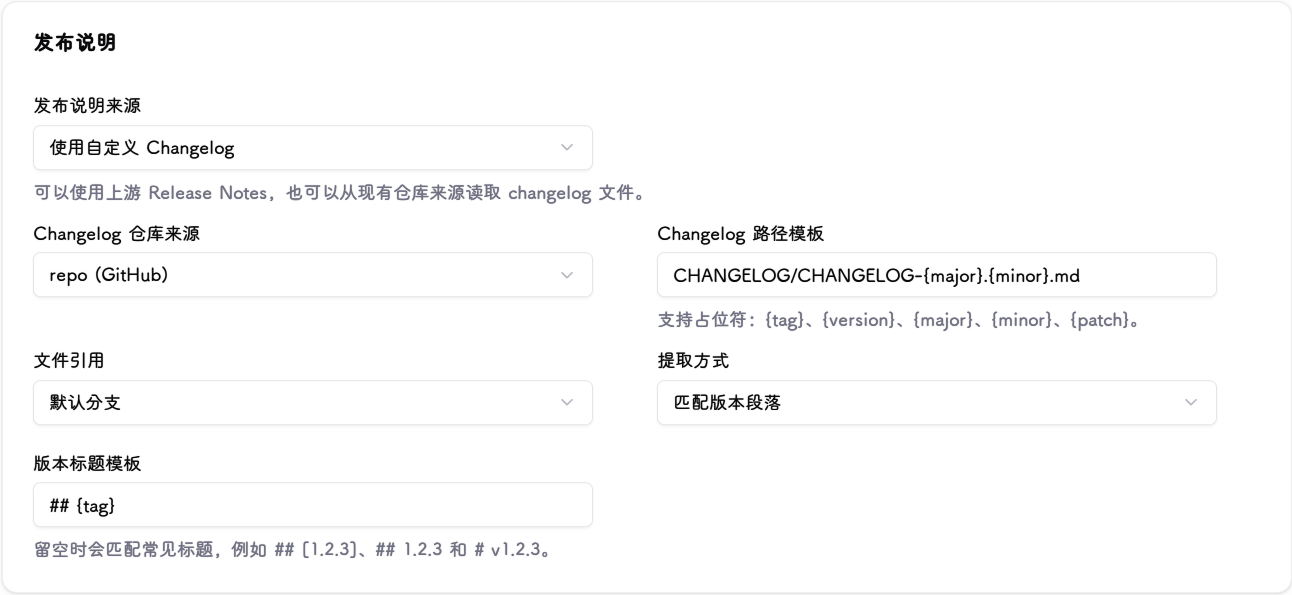
Keep Release Notes when upstream already supplies them. Use a custom changelog only when notes live in a repository file; the tracker must include a GitHub, GitLab, or Gitea source.
| File layout | Path template | Extraction mode |
|---|---|---|
| One file, multiple versions | CHANGELOG.md |
Matched version section |
| One file per version | docs/releases/{version}.md |
Entire file |
| Kubernetes-style | CHANGELOG/CHANGELOG-{major}.{minor}.md |
From subheading in matched section |
Paths support {tag}, {version}, {major}, {minor}, and {patch}. Read from the default branch, release tag, or a specified branch / tag / commit. Leave the heading template blank for automatic matching; specify it if matching fails. Subheading extraction needs a prefix such as Changelog since.
Verify the result
After a manual check, inspect the version tag, source, channel, and release notes. Disabling a tracker stops scheduled checks without deleting configuration. Use missing or unexpected versions to troubleshoot. Fix the rules before enabling automatic execution.